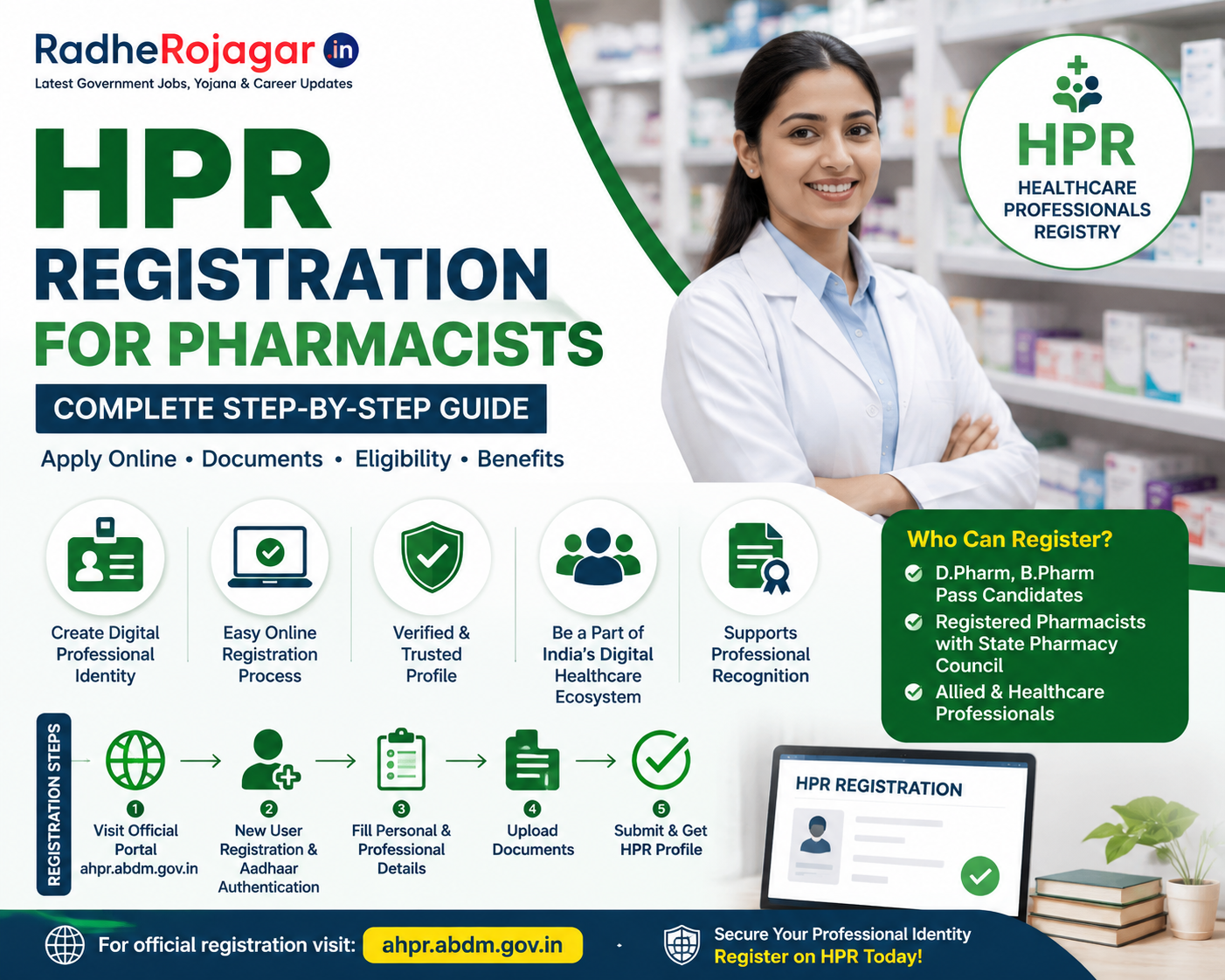
The Healthcare Professionals Registry (HPR) is a digital registry developed under the Ayushman Bharat Digital Mission (ABDM) of the Government of India. It is designed to create a verified digital identity for healthcare professionals and make professional information available within India’s digital healthcare ecosystem.
For pharmacists and other healthcare professionals, digital registration can help establish a verified professional profile and support participation in digital healthcare services.
The National Health Authority (NHA), which implements ABDM, has developed digital registries for healthcare professionals, healthcare facilities and other components of the national digital health ecosystem. The Government has reported that more than 8.35 lakh healthcare professionals were registered on HPR as of March 2026.
What is HPR?
HPR stands for Healthcare Professionals Registry.
It is a national digital registry under ABDM that maintains information about registered healthcare professionals. The objective is to create a trusted and verifiable digital identity for professionals working in the healthcare sector.
HPR is different from a professional registration certificate issued by a State Pharmacy Council.
Important distinction
A pharmacist should understand the difference between:
- State Pharmacy Council registration – This is the professional registration/licence-related process applicable to pharmacists under the pharmacy regulatory framework.
- HPR/AHPR registration – This is a digital registration/enrolment within the Government’s ABDM ecosystem.
Therefore, HPR registration should not automatically be treated as a replacement for registration with the relevant State Pharmacy Council.
Why Should a Pharmacist Register on HPR?
A digital professional registry can provide several advantages:
- Creation of a digital professional profile.
- Verification of professional information.
- Integration with the ABDM digital healthcare ecosystem.
- Better discoverability of healthcare professionals within supported digital services.
- Easier digital verification of professional credentials where supported.
- Participation in India’s developing interoperable digital health infrastructure.
ABDM describes the Healthcare Professionals Registry as one of the key building blocks of the national digital health ecosystem.
Documents and Information Required
Before starting the registration process, keep your important documents and information ready.
Depending on the registration route and verification requirements, you may need:
- Aadhaar number or another accepted identity document.
- Mobile number linked with Aadhaar, where Aadhaar-based authentication is used.
- Recent photograph, if requested.
- Pharmacy qualification details.
- Diploma in Pharmacy (D.Pharm), Bachelor of Pharmacy (B.Pharm), or other applicable qualification details.
- Educational institution/university details.
- Year of passing.
- State Pharmacy Council registration details.
- Registration number/certificate details.
- Professional information.
- Email address and mobile number.
The exact documents and fields shown on the portal may change as the Government updates the registration system.
Step-by-Step HPR/AHPR Registration Process
Step 1: Visit the Official ABDM Professional Registration Portal
Start by visiting the official Government portal used for Allied and Healthcare Professional enrolment:
AHPR Portal: https://ahpr.abdm.gov.in/
The official user manual instructs new users to access the portal and select the option for login or enrolment.
Always use the official Government/ABDM website rather than an unofficial website offering HPR registration services.
Step 2: Select Login or Enrolment
On the portal, select:
“Click here for Login or Enrolment”
You will then be taken to the login/enrolment interface.
For a person who has not previously registered, select the option for a new user.
Step 3: Select “For New User”
If you are registering for the first time, select:
For New User
The system will display instructions regarding the enrolment process.
Read the instructions carefully and proceed by selecting Next.
Step 4: Aadhaar Authentication
The official AHPR user manual describes Aadhaar-based enrolment as one of the steps in the process.
You may be asked to enter your:
Aadhaar Number
You will then have to provide the required consent and complete the CAPTCHA before requesting an Aadhaar OTP.
The OTP is sent through the Aadhaar authentication process.
Enter the OTP received and complete authentication.
Step 5: Enter Personal Details
After successful authentication, the portal may display or request personal information.
Check all details carefully, including:
- Full name
- Date of birth
- Gender
- Mobile number
- Address
- Other demographic information
Make sure the information matches your official documents.
If there is a spelling mistake in your name or another important identity detail, do not knowingly submit incorrect information.
Step 6: Enter Professional Details
The next stage involves entering your professional information.
As a pharmacist, you should keep your pharmacy qualification and registration information available.
Typical information may include:
- Profession
- Qualification
- Specialization, if applicable
- Institution/university
- Year of completion
- Professional registration information
- State
- Registration number
Select the profession exactly as it appears in the available options.
Step 7: Enter Pharmacy Council Registration Details
This is an especially important step for pharmacists.
Enter your applicable State Pharmacy Council registration information accurately.
For example, you may need to provide:
- Pharmacy Council name
- Pharmacist registration number
- Registration date
- Registration status
- Certificate/document details, where requested
Your HPR/AHPR information should be consistent with your professional registration records.
Step 8: Upload Supporting Documents
If the portal asks for supporting documents, upload clear and readable copies.
Possible documents may include:
- Pharmacy degree/diploma certificate
- Pharmacy Council registration certificate
- Identity document
- Other qualification documents
- Other documents requested by the portal
Make sure:
- The document is readable.
- Your name is clearly visible.
- The registration number is visible where applicable.
- The document is not cropped.
- The uploaded file meets the portal’s size and format requirements.
Step 9: Review the Application
Before submitting the application, carefully check every field.
Pay particular attention to:
- Name spelling
- Date of birth
- Mobile number
- Qualification
- Passing year
- Pharmacy Council
- Registration number
- State
- Uploaded documents
A small mistake in professional registration information can create verification problems later.
Step 10: Submit the Application
After reviewing all information, submit the enrolment/application.
Depending on the current workflow, the application may go through verification before the professional profile becomes fully verified.
Keep any acknowledgement, application number, enrolment ID or other reference number provided by the portal.
Step 11: Verification
Professional information may need to be verified against the relevant records.
If additional information or documents are requested, provide them through the official portal.
Do not submit false or altered documents.
If there is a mismatch between your application and Pharmacy Council records, resolve the underlying discrepancy with the appropriate authority.
Step 12: HPR/AHPR Profile
After successful processing/verification, your professional profile can become part of the relevant digital professional registry.
Keep your login credentials and registration/enrolment information safe.
What If I Already Have State Pharmacy Council Registration?
Having registration with a State Pharmacy Council is important for practising as a pharmacist, but it does not necessarily mean that you automatically have an HPR/AHPR digital profile.
If you want to participate in the ABDM professional registry, you should check the current official portal and follow the applicable digital enrolment process.
Is HPR Registration Mandatory for Pharmacists?
HPR/AHPR registration should not be confused with statutory registration with a Pharmacy Council.
Whether a particular pharmacist is required to register on a specific ABDM registry for a particular job, service or digital platform depends on the requirements of that organisation and the applicable Government/regulatory rules.
Therefore, pharmacists should not surrender or ignore their State Pharmacy Council registration simply because they have completed an HPR/AHPR enrolment.
Common Problems During Registration
1. Aadhaar OTP Not Received
Possible reasons include:
- Mobile number issues.
- Temporary authentication problems.
- Network problems.
- Incorrect Aadhaar details.
Try again after checking the information.
2. Name Mismatch
If your Aadhaar name and professional records contain different spellings, the verification process may encounter difficulties.
Use your official records and follow the correction/verification procedure provided by the relevant authority.
3. Pharmacy Registration Number Not Found
If your Pharmacy Council registration details are not recognised, check:
- Registration number
- State Pharmacy Council
- Name spelling
- Registration status
If the problem continues, contact the relevant Pharmacy Council or the support channel provided by the portal.
4. Document Upload Error
Check the portal’s requirements for:
- File format
- Maximum file size
- Image/PDF quality
- Document orientation
Upload a clear, complete document.
5. Application Pending
A submitted application may require verification. If it remains pending, check the application status through the official portal and use the official support mechanism if necessary.
HPR Registration vs Pharmacy Council Registration
| Feature | Pharmacy Council Registration | HPR/AHPR Registration |
|---|---|---|
| Main purpose | Professional/statutory registration | Digital healthcare professional registry |
| Authority/system | Relevant Pharmacy Council | ABDM/NHA ecosystem |
| Professional licence significance | Important for lawful professional practice | Digital registry/identity |
| Digital health ecosystem | Not its primary purpose | Central purpose |
| Should one replace the other? | No | No |
Important Safety Tips
Pharmacists should be careful when registering online.
Use only official websites
Do not provide Aadhaar, OTP, professional registration details or other sensitive information to random agents or unofficial websites.
Never share your OTP
Government portals and legitimate verification systems may request an OTP, but you should enter it only on the official portal.
Never send your OTP to another person.
Check the website address
Before entering personal information, verify that you are using an official Government/ABDM website.
Avoid unnecessary payments
Be cautious of websites or individuals claiming that an unusually high payment is required to obtain an HPR registration.
Check the official portal for the current process and any applicable charges.
Frequently Asked Questions
What does HPR mean?
HPR means Healthcare Professionals Registry, a digital registry under India’s Ayushman Bharat Digital Mission.
Can a B.Pharm graduate register?
Eligibility and available profession/qualification options depend on the current ABDM registry workflow and applicable professional requirements. A B.Pharm graduate should check the profession and qualification options displayed on the official portal.
Can a D.Pharm pharmacist register?
The applicable registration route depends on the current professional category and eligibility rules displayed by the official ABDM/AHPR portal. A D.Pharm holder should check the current portal options and maintain valid Pharmacy Council registration.
Is Aadhaar required?
The official AHPR manual currently describes Aadhaar-based authentication as part of the enrolment process. The exact authentication options available to an applicant should be checked on the live official portal.
Is HPR the same as ABHA?
No.
ABHA is the Ayushman Bharat Health Account for individuals/citizens, while HPR is a registry for healthcare professionals.
Is HPR the same as a Pharmacy Council registration number?
No.
A Pharmacy Council registration number is associated with professional registration, whereas HPR/AHPR is part of the ABDM digital healthcare ecosystem.
Conclusion
HPR/AHPR registration is an important part of India’s developing digital healthcare infrastructure. Pharmacists who are eligible for the relevant professional registry can use the official ABDM portal to complete digital enrolment and provide their professional information.
The basic process involves visiting the official portal, choosing new-user enrolment, completing identity authentication, entering personal and professional information, providing Pharmacy Council/qualification details where requested, uploading supporting documents, and submitting the application for verification.
Because Government portals and eligibility categories can change, pharmacists should always verify the latest requirements directly on the official ABDM portal before submitting their application.
Official Resources
- ABDM/AHPR portal: https://ahpr.abdm.gov.in/
- Official AHPR User Manual: available through the ABDM/AHPR portal and Government documentation.
- Ayushman Bharat Digital Mission: https://abdm.gov.in/
Important: HPR/AHPR digital enrolment does not by itself replace the pharmacist’s applicable State Pharmacy Council registration or other statutory professional requirements.